# Rematch Code Deep Dive: Part 1 - Comparing Rematch and Redux
Rematch Code Deep Dive: Part 1 - Comparing Rematch and Redux
After reading [Redesigning Redux](https://hackernoon.com/redesigning-redux-b2baee8b8a38), this article continues the discussion on the differences between Rematch and Redux. I will implement a simple Counter application using Redux, and then Rematch. For the Redux implementation, asynchronous processing will be handled using [redux-thunk](https://github.com/reduxjs/redux-thunk) or [redux-saga](https://github.com/redux-saga/redux-saga). Through this example, I will compare the differences between Rematch and Redux, and explore the advantages of Rematch, such as reduced learning curve and less code. Finally, I will discuss how Rematch wraps Redux to facilitate a smooth transition. This will involve an exploration of Rematch's code architecture, which I have divided into several parts and will explain in subsequent posts.
## **Counter Example**
I will use Redux and Rematch to implement a simple counter application in React, featuring increment, decrement, and asynchronous increment functionalities.

### **Redux Implementation**
In the pure Redux implementation, there are two approaches to implementing the asynchronous increment functionality: one using [redux-thunk](https://github.com/reduxjs/redux-thunk) and the other using [redux-saga](https://github.com/redux-saga/redux-saga).
The directory structure is very simple:
```
src
|—— components
| |—— Counter.js
|—— reducers
| |—— index.js
|—— index.js
```
`components/Counter.js`
```js
import React, { Component } from "react";
import PropTypes from "prop-types";
class Counter extends Component {
render() {
const { value, onIncrement, onDecrement, onIncrementAsync } = this.props;
return (
Clicked: {value} times {" "}
{" "}
);
}
}
Counter.propTypes = {
value: PropTypes.number.isRequired,
onIncrement: PropTypes.func.isRequired,
onDecrement: PropTypes.func.isRequired,
onIncrementAsync: PropTypes.func.isRequired,
};
export default Counter;
```
`reducers/index.js`
```js
export default (state = 0, action) => {
switch (action.type) {
case "INCREMENT":
return state + 1;
case "DECREMENT":
return state - 1;
default:
return state;
}
};
```
The code in `index.js` varies depending on the asynchronous logic used, as detailed below.
#### redux-thunk
[Click here for the complete code](https://codesandbox.io/s/counter-demo-using-redux-thunk-257hc)
If asynchronous logic uses redux-thunk, the code in `index.js` is as follows:
```js
import React from "react";
import ReactDOM from "react-dom";
import { applyMiddleware, createStore } from "redux";
import Counter from "./components/Counter";
import counter from "./reducers";
import thunk from "redux-thunk";
const store = createStore(counter, applyMiddleware(thunk));
const rootEl = document.getElementById("root");
function fakeAsyncLogic() {
return new Promise(function (rs) {
setTimeout(rs, 1000);
});
}
function makeAsyncIncrementAction() {
return async function (dispatch) {
await fakeAsyncLogic();
dispatch({ type: "INCREMENT" });
};
}
const render = () =>
ReactDOM.render(
store.dispatch({ type: "INCREMENT" })}
onDecrement={() => store.dispatch({ type: "DECREMENT" })}
onIncrementAsync={() => store.dispatch(makeAsyncIncrementAction())}
/>,
rootEl
);
render();
store.subscribe(render);
```
After using the thunk middleware, `dispatch()` can accept a function as an argument. The redux store then passes `dispatch` and `getState` as arguments to this function. This way, if the function is asynchronous, it can asynchronously dispatch an action.
#### redux-saga
[Click here for the complete code](https://codesandbox.io/s/counter-demo-using-redux-saga-5c6uu)
If asynchronous logic uses redux-saga, the code in `index.js` is as follows:
```js
import React from "react";
import ReactDOM from "react-dom";
import { createStore, applyMiddleware } from "redux";
import createSagaMiddleware from "redux-saga";
import Counter from "./components/Counter";
import counter from "./reducers";
import defaultSaga from "./reducers/saga";
const sagaMiddleware = createSagaMiddleware();
const store = createStore(counter, applyMiddleware(sagaMiddleware));
const rootEl = document.getElementById("root");
sagaMiddleware.run(defaultSaga);
const render = () =>
ReactDOM.render(
store.dispatch({ type: "INCREMENT" })}
onDecrement={() => store.dispatch({ type: "DECREMENT" })}
onIncrementAsync={() => store.dispatch({ type: "INCREMENT_ASYNC" })}
/>,
rootEl
);
render();
store.subscribe(render);
```
Apart from the differences in middleware configuration, unlike redux-thunk which dispatches a function as an action, saga requires defining some asynchronous logic (using saga's built-in asynchronous APIs). Therefore, a `saga.js` is added under the `src/reducers` directory:
```js
import { takeEvery, call, put } from "redux-saga/effects";
async function fakeAsyncLogic() {
return new Promise((rs) => setTimeout(rs, 1000));
}
function* increamentAsync() {
yield call(fakeAsyncLogic);
yield put({ type: "INCREMENT" });
}
export default function* defaultSaga() {
yield takeEvery("INCREMENT_ASYNC", increamentAsync);
}
```
Saga uses [generator functions](https://developer.mozilla.org/en-US/docs/Web/JavaScript/Reference/Global_Objects/Generator) to control the asynchronous flow more precisely. The above code exports a default saga function. `takeEvery("INCREMENT_ASYNC", incrementAsync)` listens for all actions with `action.type` as `INCREMENT_ASYNC`, and upon detecting such an action, executes the `incrementAsync()` function. This function uses `call(fakeAsyncLogic)` to simulate an asynchronous call, followed by `put({ type: "INCREMENT" })` to dispatch an action, eventually triggering the reducer to execute.
### **Rematch Implementation**
[Click here for the complete code](https://codesandbox.io/s/counter-demo-using-rematch-3u2nf)
In Rematch, there are no separate reducers; the reducer belongs to a data structure called a model, so the directory structure is slightly different (replace `reducers` with `models`):
```
src
|—— components
| |—— Counter.js
|—— models
| |—— index.js
|—— index.js
```
The code in `Counter.js` remains unchanged, and the code in `models/index.js` is as follows:
```js
async function fakeAsyncLogic() {
return new Promise((rs) => {
setTimeout(rs, 1000);
});
}
export const count = {
state: 0,
reducers: {
increment: (state) => {
return state + 1;
},
decrement: (state) => {
return state - 1;
},
},
effects: (dispatch) => ({
async incrementAsync() {
await fakeAsyncLogic();
dispatch.count.increment();
},
}),
};
```
As you can see, we have defined a model named `count`, which includes `state`, `reducers`, and `effects`. The `state` is data belonging to the model, equivalent to the first parameter of the redux reducer function (or its return value). The `reducers` are equivalent to the redux reducer, and the `effects` include some side-effect logics (like API calls, etc.).
Finally, the `index.js`:
```js
import { init } from "@rematch/core";
import React from "react";
import ReactDOM from "react-dom";
import Counter from "./components/Counter";
import * as models from "./models";
const store = init({ models });
// const store = createStore(counter, applyMiddleware(thunk));
const rootEl = document.getElementById("root");
const render = () =>
ReactDOM.render(
store.dispatch({ type: "count/decrement" })}
onIncrementAsync={() => store.dispatch({ type: "count/incrementAsync" })}
/>,
rootEl
);
render();
store.subscribe(render);
```
At this point, the `store` is no longer created using Redux's API `createStore`, but instead with Rematch's `init`. Two points to note here:
1. Now `store.getState()` returns not a number but `{ count: number }`.
2. `store.dispatch` is not just a function (maintaining the Redux call method), but also supports calling a reducer or effect in the form of `dispatch.modelName.xxx`. However, it should be noted that `action.type` is now in the form of `modelName/reducerName` or `modelName/effectName`.
As mentioned before, the smallest unit in Rematch is a model. Therefore, the above changes are also made to accommodate the model format.
## Rematch vs Redux
From the above example, we can see several differences between the two:
1. If using Redux, asynchronous actions require separate middleware, such as thunk or saga. In contrast, Rematch can directly use ES's `async/await` syntax for asynchronous action dispatch.
2. Redux does not have the concept of a model. If the state structure is complex, [combineReducers](https://redux.js.org/recipes/structuring-reducers/initializing-state#combined-reducers) can be used to merge different reducers, forming a similar state structure. Rematch natively supports this.
3. Redux's `store.dispatch` is simply a function. However, Rematch retains this function functionality while also providing a way for chainable calls.
Since the example above is quite simple, the differences are not numerous. More differences can be found in [Redesigning Redux](https://hackernoon.com/redesigning-redux-b2baee8b8a38). Here are two more common differences:
1. Redux makes more use of functional programming ideas, such as the [`compose`](https://redux.js.org/api/compose) utility function provided for combining store enhancers during store initialization.
2. Simplified reducers mainly include omitting the definition of `action.type` constants and omitting the `switch/case` branch in the reducer. Therefore, a reducer in a Rematch model is equivalent to a `case` branch, with its name acting as `action.type`.
In my opinion, Rematch is superior to Redux in three main aspects:
1. More "rational" data structure design: Rematch uses the concept of a model, integrating state, reducer, and effect. This integration is very practical in frontend development, for example, designing different models for different page routes.
2. Simpler API design: Redux uses function composition for configuration, which may be confusing at first for developers unfamiliar with functional programming. Rematch, on the other hand, uses object-based configuration options, which are easier to grasp.
3. Less code:
- Eliminates the need for a large number of `action.type` constants and branch decisions in Redux.
- Native syntax support for asynchronous operations, eliminating the need for middleware. Using saga has a learning curve, and using thunk, with its varied action types, can also be confusing.
Additionally, Rematch provides a plugin mechanism. Besides many community-developed plugins, we can also do custom development. The plugins will be detailed in later posts.
## **Rematch Code Structure**
We know that Rematch is essentially a wrapper based on Redux, simplifying Redux's complex syntax:
> Rematch is Redux best practices without the boilerplate.
Because of this, it is still fundamentally Redux and does not diminish Redux's functionality. So, how does Rematch achieve this? How is it designed? I will next explain the core code structure of Rematch based on v1.4.0 (the last version of Rematch v1).
> Note: I participated in the update of Rematch v2 and will write a separate post introducing the changes from Rematch v1 to v2. v1 is used here because its logic has not fundamentally changed, and it is easier to read and understand, whereas v2 has significant changes in coding styles.
Let's first look at the code directory structure of Rematch v1.4.0:
```
...
plugins
|—— ...
|—— loading
|—— immer
|—— select
src
|—— plugins
| |—— dispatch.ts
| |—— effects.ts
|—— typings
| |—— index.ts
|—— utils
| |—— deprecate.ts
| |—— isListener.ts
| |—— mergeConfig.ts
| |—— validate.ts
|—— index.ts
|—— pluginFactory.ts
|—— redux.ts
|—— rematch.ts
```
I have divided the Rematch code into the following components:
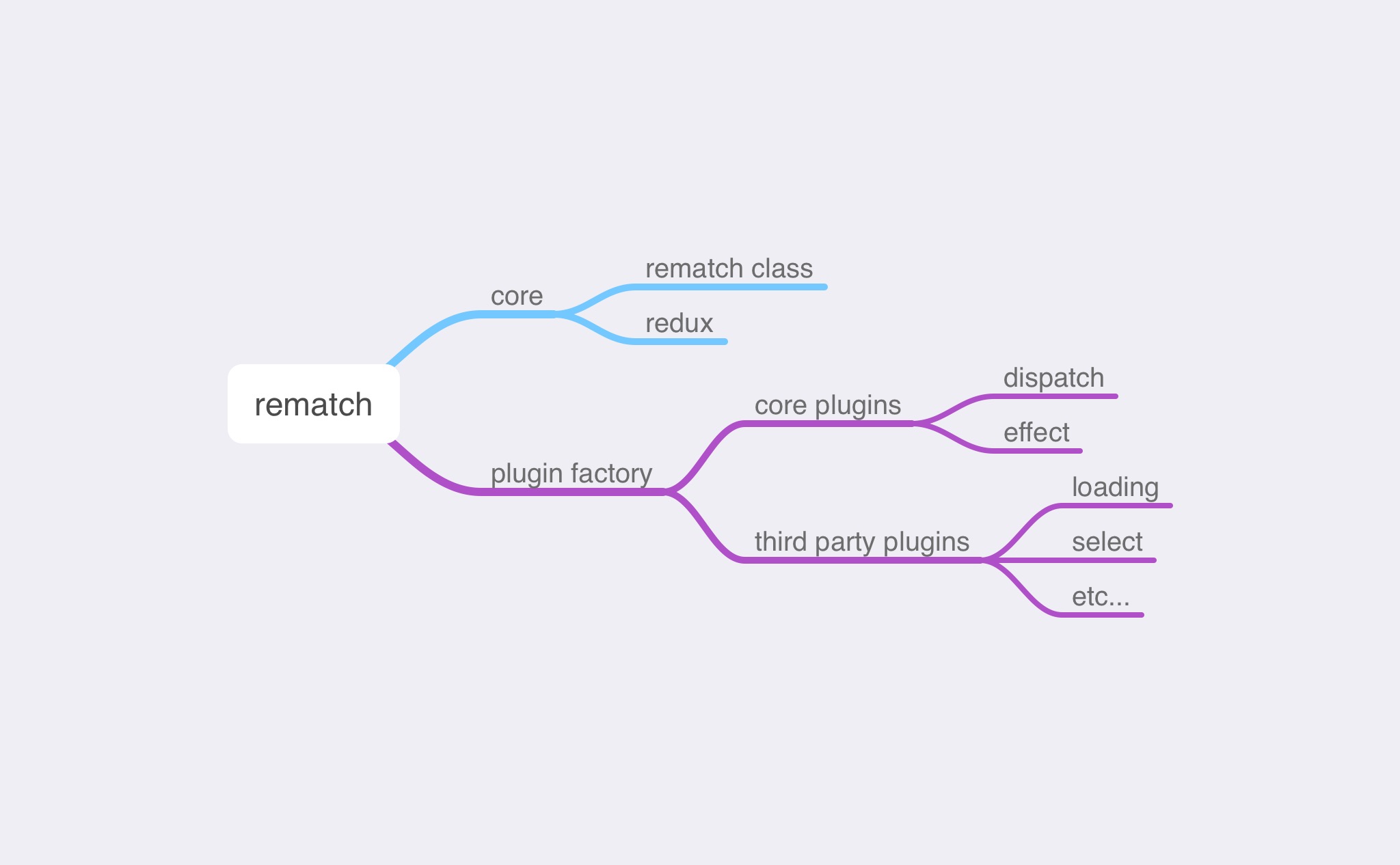
Rematch consists of a core and plugins. The core is divided into two parts: the Rematch class and the `redux.ts` file. The former is the core source code of Rematch, while the latter mainly contains code for reducer merging, used for creating the Redux store.
The plugin mechanism in Rematch is used to enhance its functionality, with the main code defined in the plugin factory. The Rematch core includes two essential plugins: dispatch and effect. The dispatch plugin enhances the `store.dispatch` function, allowing for chainable calls. The effect plugin primarily supports the `async/await` asynchronous pattern. In addition to these two plugins, the Rematch team has developed other third-party plugins, such as loading, select, etc., integrating features like asynchronous request loading status and selectors.
Next, I will explain these parts in detail, breaking them down into three posts: Rematch core, plugin factory & core plugins, and 3rd party plugins. After these three posts, I will write two more posts. One will cover the changes from Rematch v1 to v2, and the other will introduce the Rematch type system (the most significant change brought by the v2) as well as some remaining issues and challenges with this type system, which I hope to discuss with you all.
Stay tuned!